Flagship product · Roku Channel Store

Thunder Player.
The Roku channel that actually feels like Netflix.

Your brand on the official Roku Channel Store, with an interface your customer recognizes the moment they see it: dynamic hero, HD TMDB posters, episodes with thumbnails, automatic resume and 6-character code login. One-time payment, no monthly fees.

Official Roku Channel Store 6-character code login Multi-account & sync One-time payment

What your customer sees

A Netflix-style experience inside Roku.

Real product screenshots. No mockups. This is what shows up on a Roku 3.x or higher TV when your customer opens your channel.

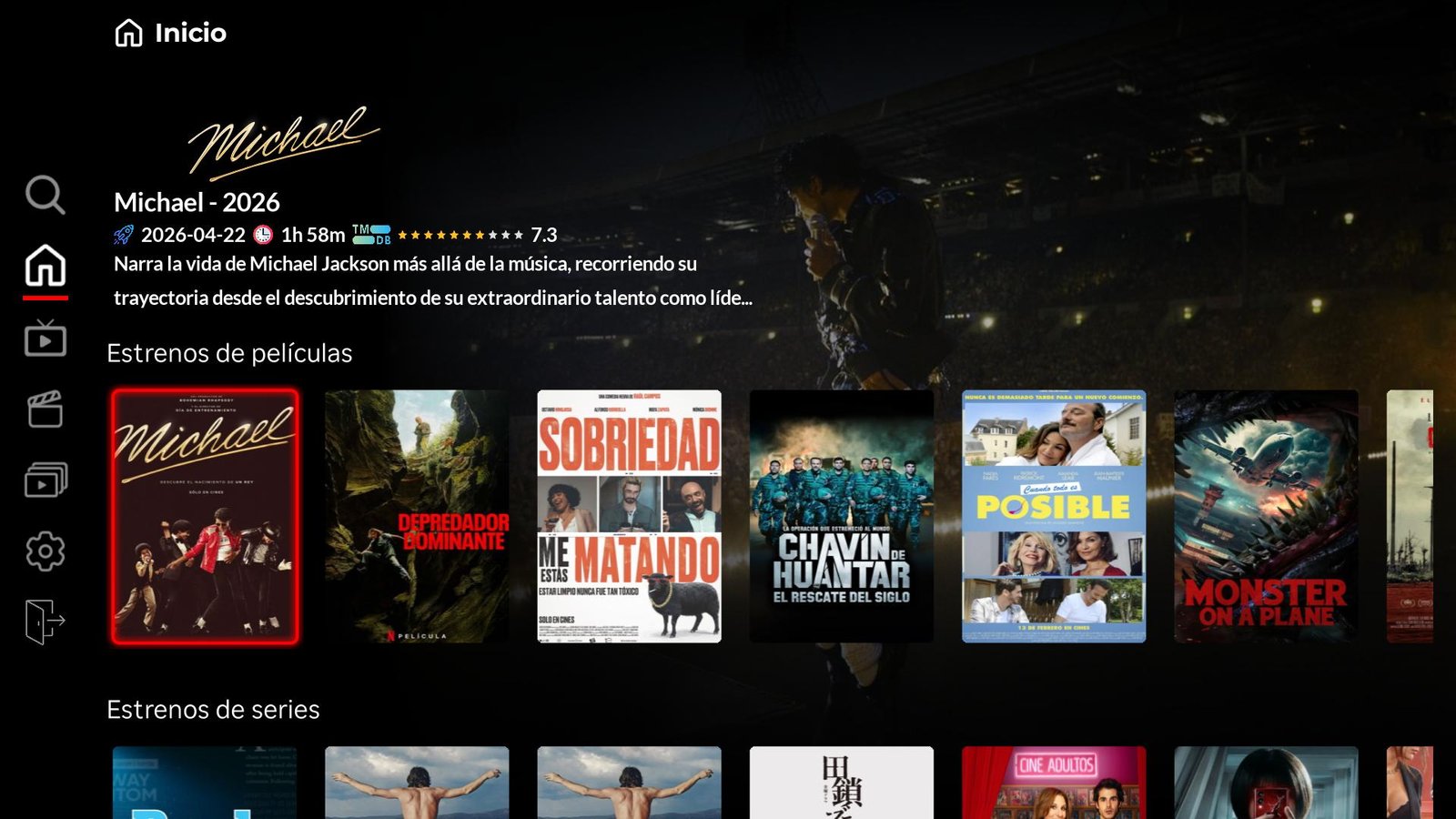
Thunder Player home screen on Roku with dynamic hero changing with the focused poster, showing the movie Michael 2026 and a new releases shelf

Home with dynamic hero

When they open your channel, customers see a giant hero with backdrop, TMDB rating and synopsis. The hero changes live as the customer focuses different posters with the remote — they scroll through the new releases row and the background updates instantly. The same visual language they already know from Netflix or HBO.

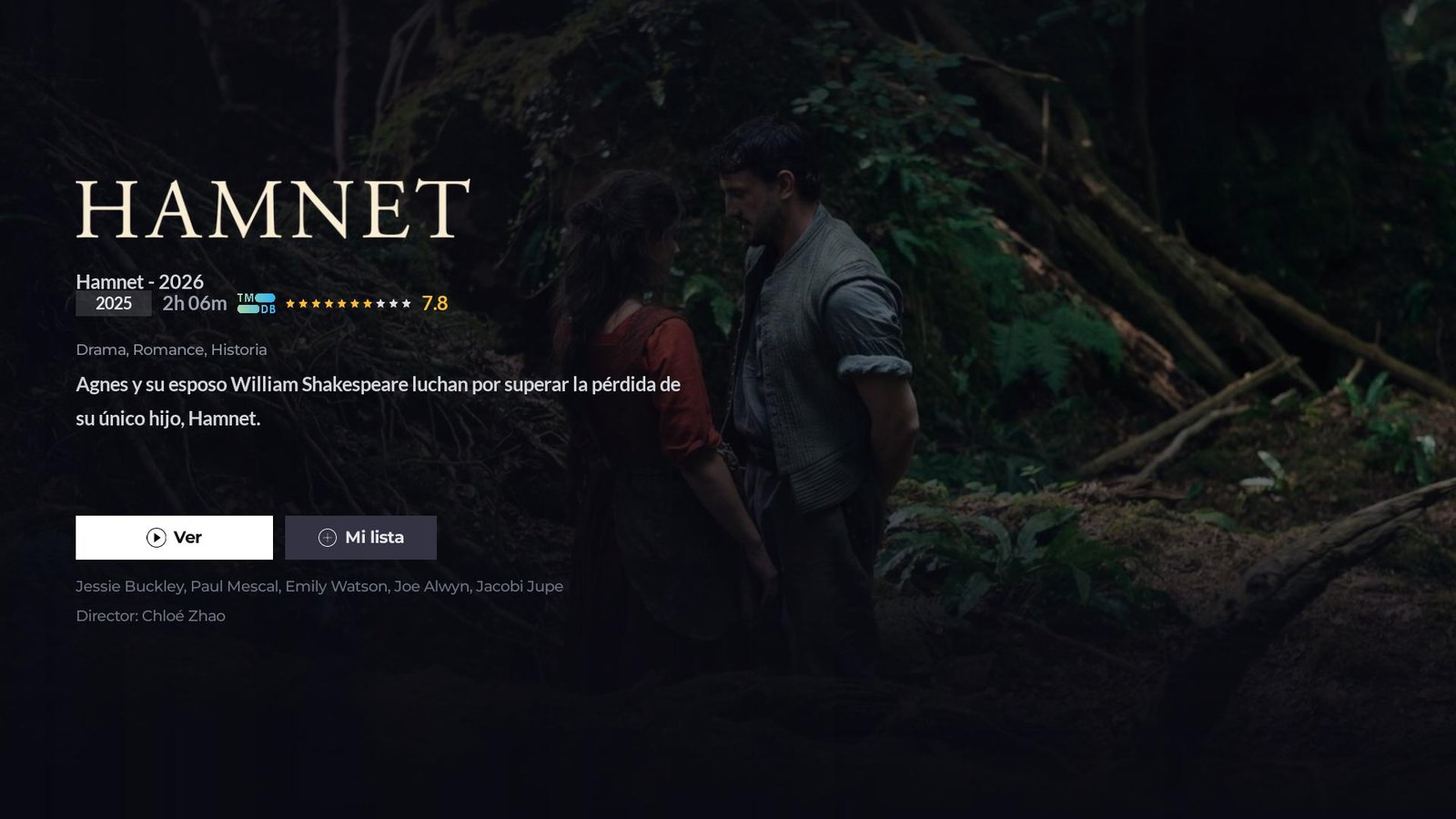
Hamnet full screen detail in Thunder Player Roku with movie logo, cast, director Chloé Zhao and Watch and My list buttons

Per-movie detail page

Official backdrop, movie logo, year, runtime, rating, genres, synopsis, cast and director. Watch and My list buttons exactly where the customer expects them. Data loaded from TMDB in HD.

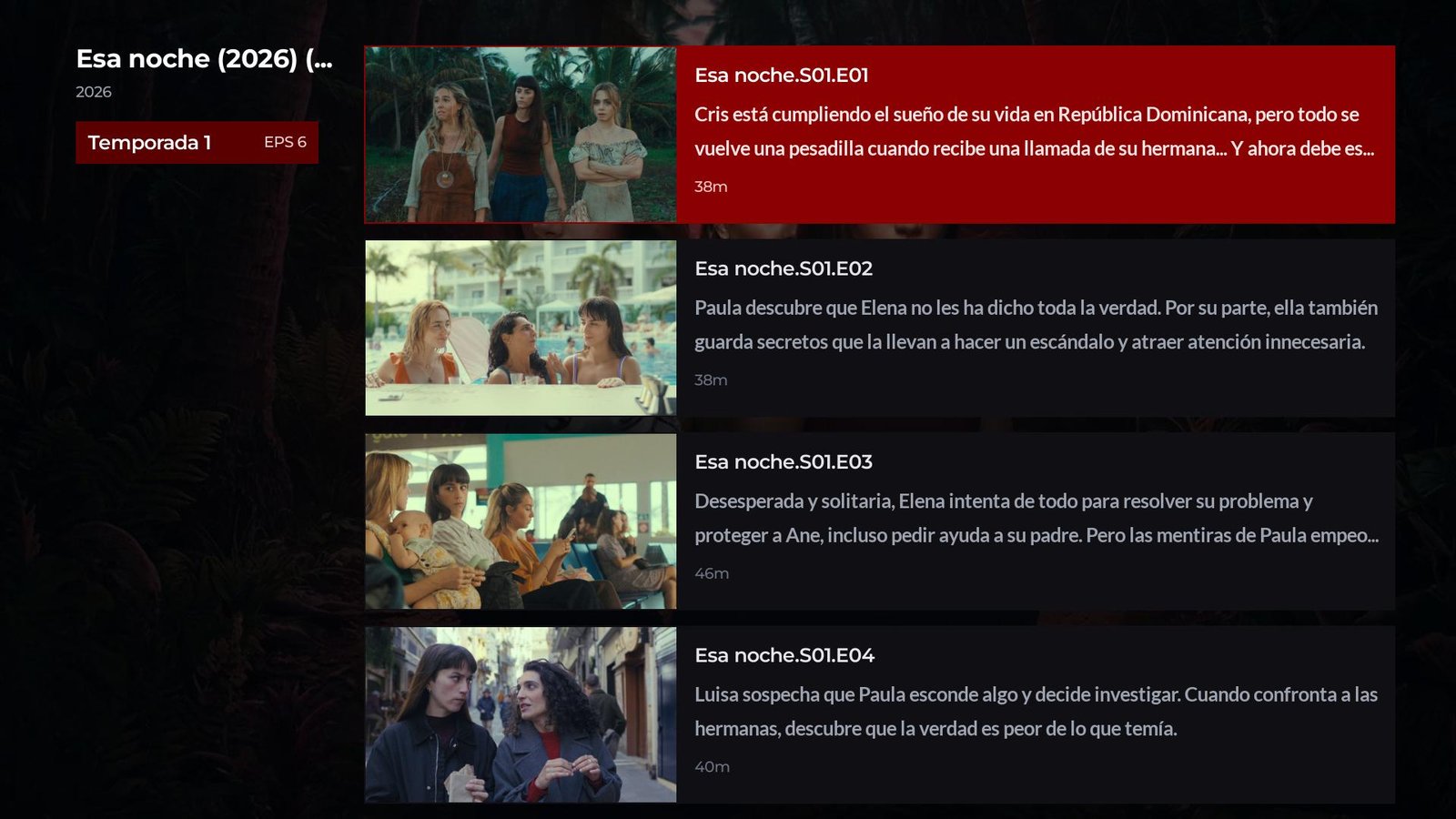
Episodes of the series Esa noche season 1 in Thunder Player Roku with thumbnail, title and runtime per chapter

Series with seasons and episodes

Each episode with a real thumbnail, synopsis and runtime. Automatic watched marking. Auto-play of the next episode with countdown. Resume from where they left off.

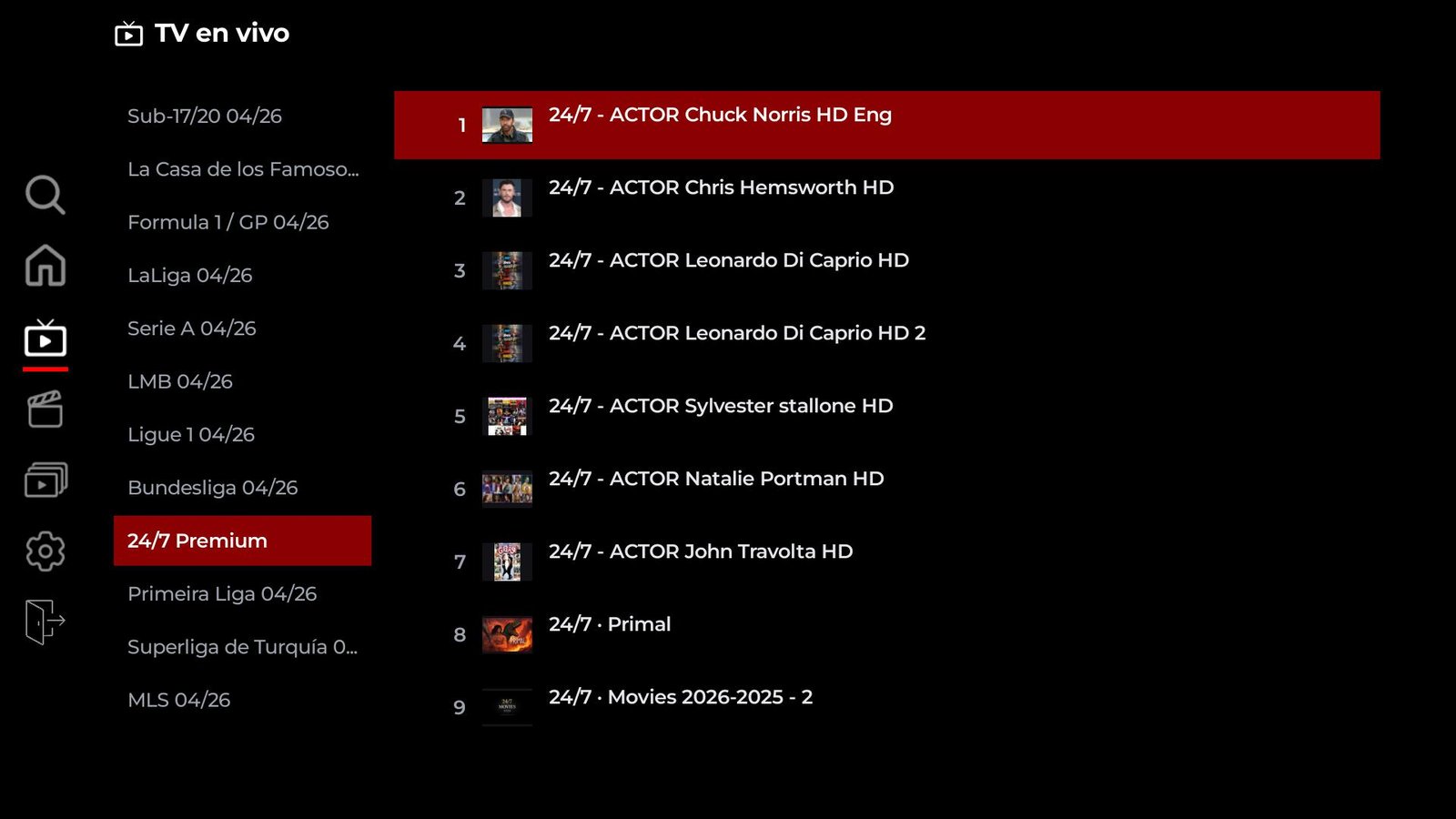
24/7 Premium channels in Thunder Player Roku with actor thumbnails and live channels carousel

Live TV with EPG guide

Sorted categories (24/7 Premium, sports, soaps, regional). Channel logos and thumbnails. Up to 7 days of programming guide. My favorites always on top.

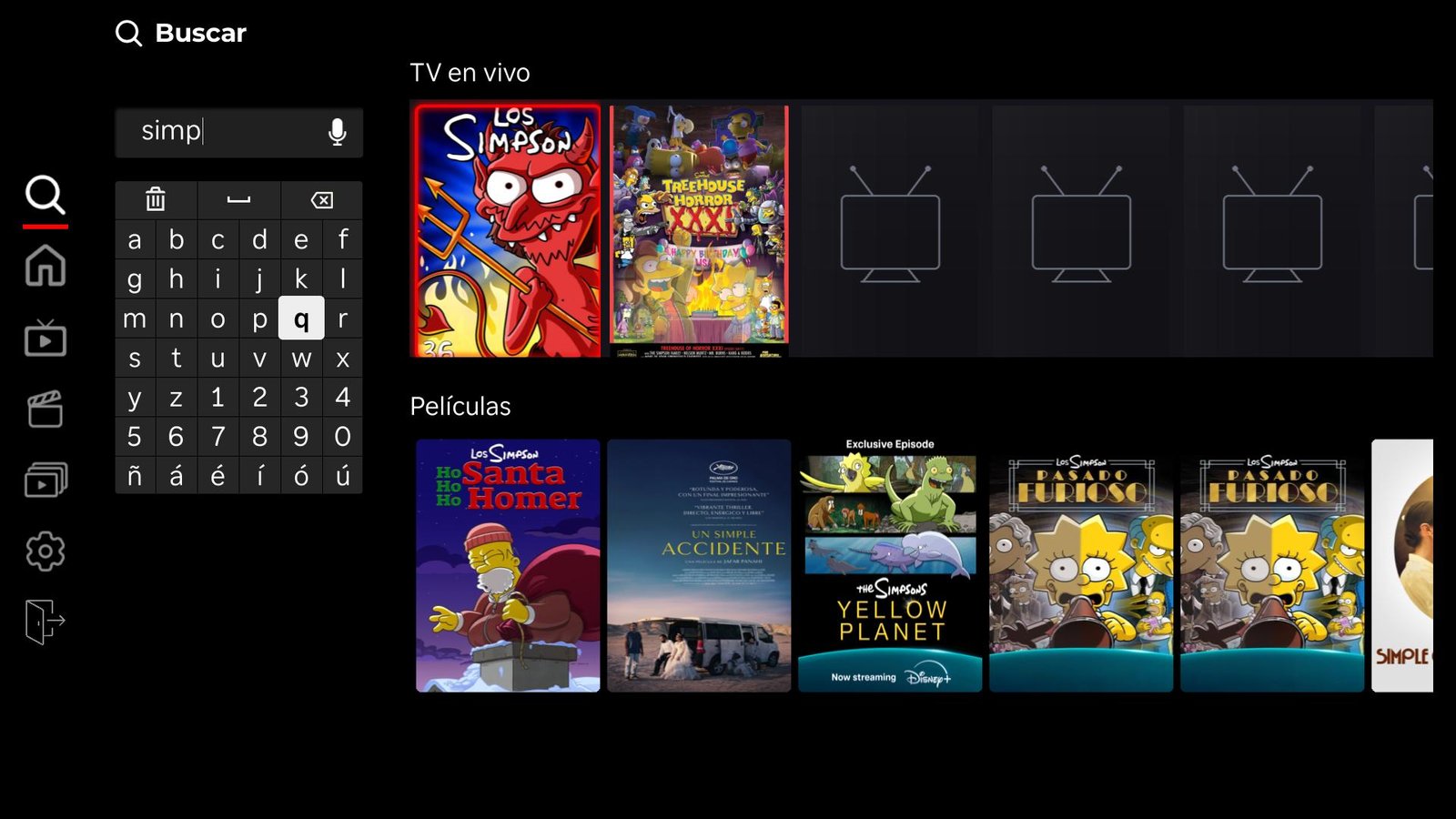
Search results for The Simpsons in Thunder Player Roku showing matches in live TV and movies at the same time

Global search

One single search, results split between live TV, movies and series at the same time. Cache for fast results. Also works against blocked IPTV servers that other apps cannot reach.

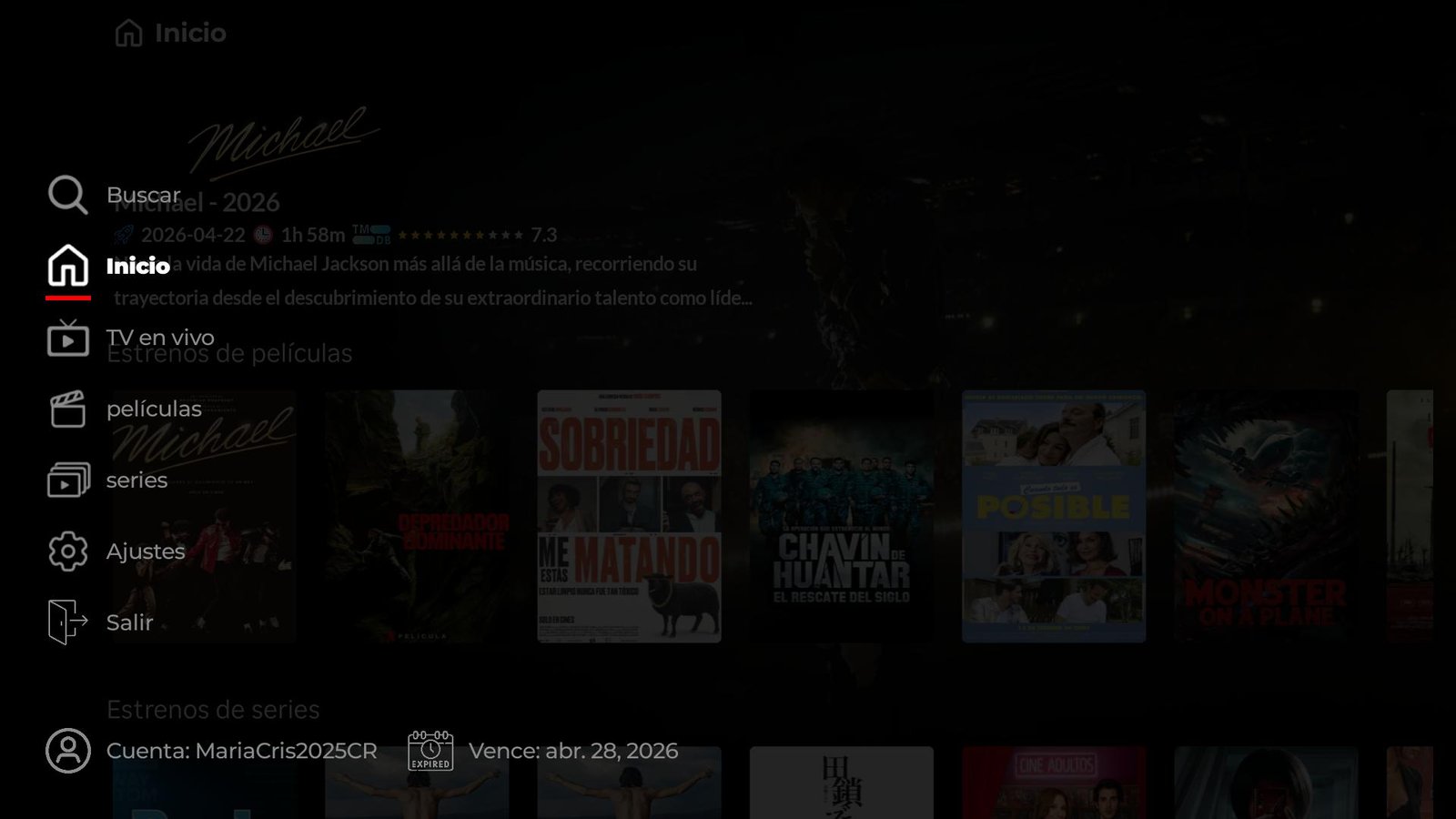
Thunder Player Roku sidebar showing customer account and IPTV subscription expiration date

Account and expiry always visible

The sidebar shows the customer alias and the exact expiry date of their subscription. Fewer "how long do I have left?" messages on your WhatsApp.

2 ways to log in

Customers never spend 5 minutes typing on the remote.

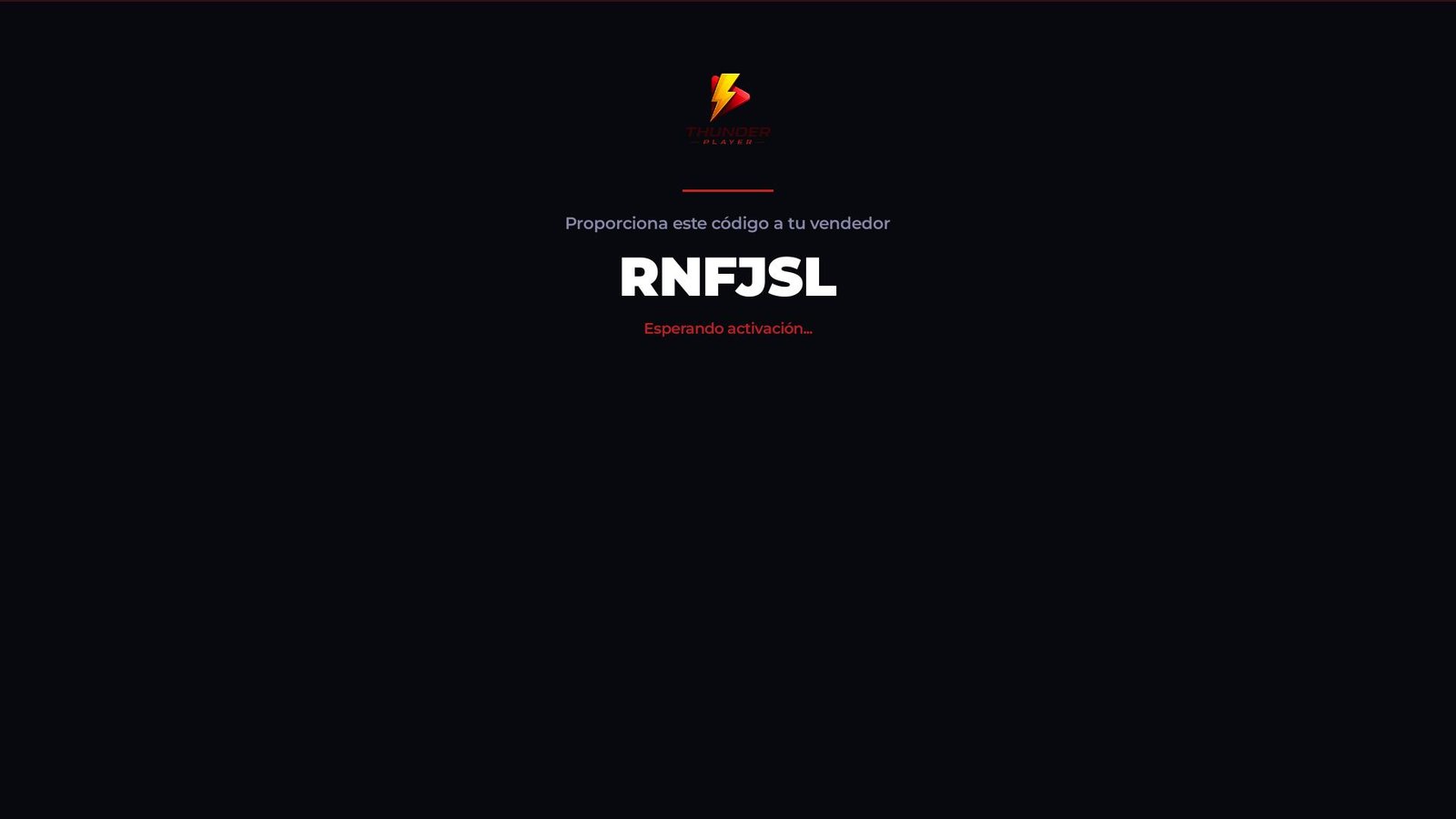
Step 1 · Customer Thunder Player login screen on Roku with Thunder Player lightning bolt logo and 6-character activation code RNFJSL ready to send to the IPTV reseller, with the message Waiting for activation
Roku screen the first time the app opens. The code RNFJSL appears large with the message "Waiting for activation…". The customer just reads it to you.
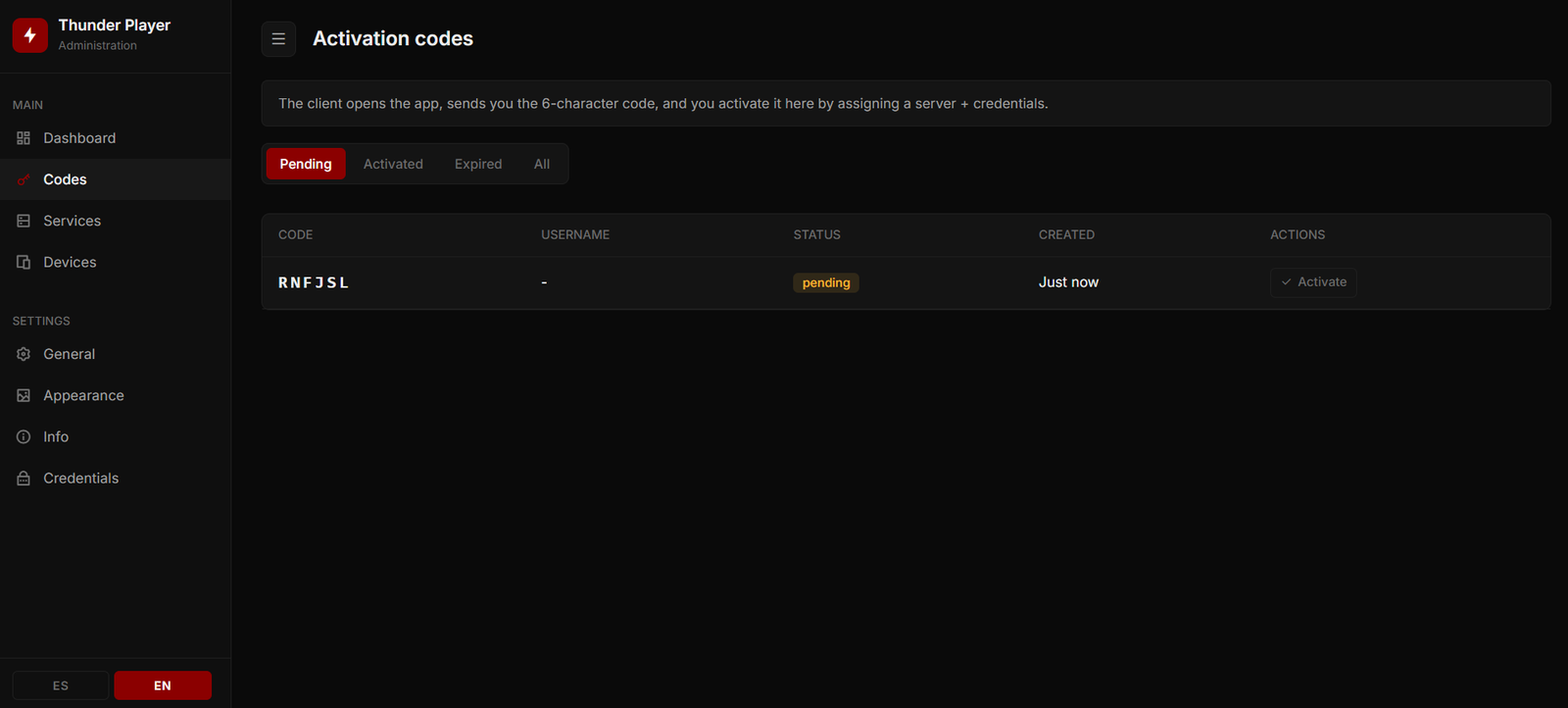
Step 2 · Your panel Thunder Player admin panel showing the Activation codes section with the same RNFJSL code in pending status, ready for the IPTV reseller to activate by assigning server and credentials
The same code RNFJSL appears automatically in the Codes section of the admin panel with status pending. You assign server + credentials and click Activate.

Result: the customer Roku enters straight into the home screen. Zero typing, zero tech support, zero calls to repeat the username.

Multi-Roku + player

Start the movie on one TV. Finish it on another. Without touching anything.

  • Synced favorites across all of the customer's Rokus.
  • Continue watching automatically across devices.
  • Multiple IPTV accounts on the same Roku, no reinstall.
  • Automatic resume of movies and episodes from where the customer left off.
  • Auto-play of the next episode with countdown at the end of each chapter.
  • 10-second skip forward/back with instant remote response.
  • HD quality over HLS streaming.
  • Parental control with 4-digit PIN and option to hide categories (live, movies or series).
  • Personalization: channel background and logo, app language.
  • Two languages: Spanish and English.
  • Continue watching · Live TV: dynamic row on the home with the last 12 live channels watched.
  • Selective wipe: clear only favorites, only "continue watching", only the account or everything.
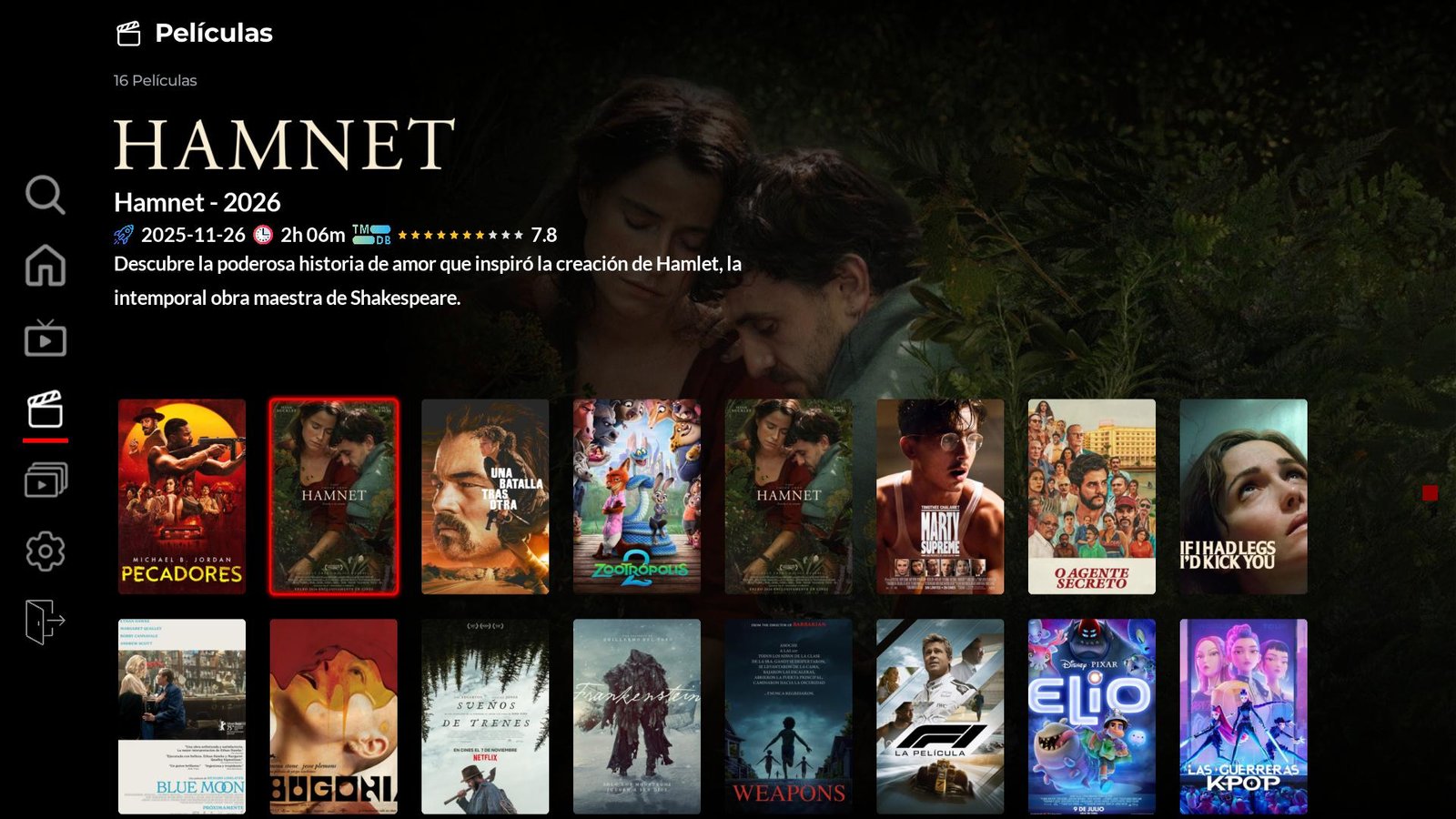
Grid of new release movies in Thunder Player Roku with Hamnet poster selected and overlaid title

Your admin panel

You manage everything. Your customer never sees it.

The private panel where you activate codes, suspend overdue payments and change credentials — without touching a single line of code:

Active devices at a glance

List of every connected Roku with customer name, device model and last check-in. Edit the alias inline to identify them quickly.

Activation codes

When the customer opens the app for the first time, their 6-character code appears automatically in your panel. You identify it, click Activate, configure their account (username and password) and their Roku enters by itself. 2-minute validity.

Instant suspend / reactivate

One click and the customer Roku closes itself in ≤ 5 minutes. You reactivate just as fast when they pay again — keeping lists, favorites and progress.

Force logout

If you need to kick someone off the air right now, there is a direct button. Useful for customers sharing accounts without permission.

Delete and restore

Delete a device from the list. If it was a mistake, restore it from the trash. Permanent deletion only when you are sure.

Remote credential changes

Edit username and password from the panel — the Roku detects the change and prompts a restart. The customer touches nothing.

Edit expiration date

Manually adjust when each account expires without it being overwritten automatically.

Linked accounts per device

Modal with primary + secondary accounts. Add, edit or remove additional lists without affecting the main one.

Channel branding

Logo, login logo and background changeable from the panel without resubmitting to Roku.

Servers with automatic failover

Configure one or more IPTV servers (DNS). The app tries them in order until it finds one that responds — the customer does not notice the failover.

Default login mode

You decide whether the app starts asking for an activation code or username/password depending on the customer profile.

Status dashboard

Summary with active, suspended and deleted device counts. Quick view of the health of your customer base.

One-time payment

Thunder Player for your Roku channel.

Thunder Player FAQ

Questions about Thunder Player Roku

Can't find your answer? Message us on WhatsApp or Telegram and we'll reply personally.

What is Thunder Player and why is it different?
Thunder Player is a Roku-only IPTV channel with a Netflix-style interface: dynamic hero that changes with the focused poster, HD TMDB posters, per-movie detail page, episodes with thumbnails and automatic resume. It is submitted through the official Roku Channel Store process under your brand, so your customer searches for it by name and installs it with one click — no private codes, no developer mode.
How does the end customer log in?
Two ways: (1) 6-character activation code — the customer opens the app for the first time, sees the code on screen and shares it with you. In your admin panel the code shows up automatically; you identify it, click "Activate", configure the customer account (username and password) and their Roku enters by itself. (2) Manual username and password using the on-screen keyboard. Additionally, inside the app they can add linked accounts to keep multiple IPTV lists on the same Roku without losing the first.
What does the admin panel include?
Full device management (suspend, reactivate, force logout, delete and restore), 6-character activation codes that arrive automatically in the panel when the customer opens the app, credential and expiration date editing with Roku auto-relogin, multiple linked accounts per device, channel branding (logo, login logo and background), multiple IPTV servers with automatic testing, dashboard with active / suspended / deleted device counts.
How much does it cost and what is included?
USD 300 one-time payment. Includes: branded Thunder Player build (logo, login logo and background), submission to the official Roku Channel Store process, full admin panel on your domain, TMDB and EPG integration, initial server setup, support during the official review.
On how many Rokus can my customer use the same account?
On as many Rokus as they want. Favorites sync automatically and "Continue watching" works across devices: start a movie on one TV and finish it on another. No extra setup needed.
What happens if a customer stops paying?
You suspend them from the panel and the app closes itself in less than 5 minutes — no need to talk to the customer. If they pay again, you reactivate them with one click and they keep their lists, favorites and progress.
Does it appear in the official Roku Channel Store?
Yes. We submit through the official Roku review process under your brand. Once approved, it is published in the Channel Store and your customers install it like any other official app — by searching for your name.
How long does it take?
Branded build: 72 business hours. Official Roku review: an additional 5–10 business days (managed by Roku, not us). If Roku requests adjustments, we do them and resubmit in 1–2 days.

Your Roku channel, ready in 72 h

Get on Roku with Thunder Player.

Tell us the name you want to use and your server credentials. We send you the build + panel access in 72 business hours.